AWS European Sovereign Cloud
.jpg)
Empowering digital transformation on AWS with full operational, legal, and data sovereignty under the European Sovereign Cloud (ESC) program.
The Future of Cloud Sovereignty in Europe
AWS is redefining sovereignty with a €7.8 billion investment in the AWS European Sovereign Cloud, an independent legal entity and cloud environment located in Brandenburg, Germany, and operated entirely by EU residents under EU law.
As an official Launch Partner, Ankercloud helps European enterprises unlock the complete potential of this transformation, combining AWS’s global innovation with full European governance and control.
%20(1).jpg)

The New Standard: Digital, Operational, and Legal Sovereignty
Digital sovereignty
All data including customer data, master data and metadata remain strictly within EU borders. Fine-grained access controls, encryption, and audit logging ensure integrity and accountability.

Operational sovereignty
Managed and supported exclusively by EU-based personnel. Segregated environments and detailed operational runbooks aligned with European regulator expectations.

Legal sovereignty
Workloads and data are governed under EU jurisdiction. Architecture patterns proven to support sector-specific and national regulatory frameworks. Future proof compliance with GDPR, DORA, NIS2 and more


What Makes the AWS European Sovereign Cloud Different
Designed to meet the most stringent EU sovereignty, security, and regulatory requirements while maintaining full AWS performance and scalability.
Independent Operations
Physically and legally separate from existing AWS Regions, ensuring true EU governance.

Metadata Residency
Even system and configuration data stays strictly within European boundaries.

EU-Only Personnel
From the Security Operations Center to technical support, your infrastructure is managed entirely by EU-based personnel.

The Full Power of AWS
Access the complete AWS service catalog, including AI/ML and analytics, without compromising on sovereignty.
Check out case studies



Check out our blog
Quality Management in the AI Era: Building Trust and Compliance by Design
The Trust Test: Why Quality is the New Frontier in AI
When we talk about quality in AI, we're not just measuring accuracy; we're measuring trust. An AI model with 99% accuracy is useless or worse, dangerous if its decisions are biased, non-compliant, or can't be explained.
For enterprises leveraging AI in critical areas (from manufacturing quality control to financial risk assessment), a rigorous Quality Management system is non-negotiable. This process must cover the entire lifecycle, ensuring that the AI works fairly, securely, and safely - a concept often known as Responsible AI.
We break down the AI Quality Lifecycle into five essential stages, guaranteeing that quality is baked into every decision.
The 5 Stage AI Quality Lifecycle Framework
Quality assurance for AI systems must start long before the model is built and continue long after deployment:
1. Data Governance & Readiness
The model is only as good as the data it trains on. We focus on validation before training:
- Data Lineage & Labeling: Enforcing traceable protocols and dataset versioning.
- Bias Detection: Pre-model checks for data bias and noise to ensure representativeness across demographics or time segments.
- Secure Access: Enforcing anonymization and strict access controls from the outset.
2. Model Development & Validation
Building the model resiliently:
- Multi-Split Validation: Using cross-domain validation methods, not just random splits, to ensure the model performs reliably in varied real-world scenarios.
- Stress Testing: Rigorous testing on adversarial and out-of-distribution inputs to assess robustness.
- Evaluation Beyond Accuracy: Focusing on balanced fairness and robustness metrics, not just high accuracy scores.
3. Explainability & Documentation
If you can't explain it, you can't trust it. We prioritize transparency:
- Interpretable Techniques: Applying methods like SHAP and LIME to understand how the model made its decision.
- Model Cards: Generating comprehensive documentation that describes objectives, intended users, and, critically, model limitations.
- Traceable Logs: Maintaining clear logs for input features and versioned training artifacts for auditability.
4. Risk Assurance & Responsible AI Controls
This is the proactive safety net:
- Harm Assessment: Formal assessment of misuse risk (intentional and unintentional).
- Guardrail Policies: Defining non-negotiable guardrails for unacceptable use cases.
- Human-in-the-Loop (HITL): Implementing necessary approval gates for safety-critical or high-risk outcomes.
5. Deployment, Monitoring & Continuous Improvement
Quality demands perpetual vigilance:
- Continuous Monitoring: Real-time tracking of accuracy, model drift, latency, and hallucination rates in production.
- Safe Rollouts: Utilizing canary releases and shadow testing before full production deployment.
- Reproducibility: Implementing controlled retraining pipelines to ensure consistency and continuous compliance enforcement.
Cloud: The Backbone of Scalable, High-Quality AI
Attempting this level of governance and monitoring without hyperscale infrastructure is impossible. Cloud platforms like AWS and Google Cloud (GCP) are not just hosting providers; they are compliance enforcement engines.
Cloud Capabilities Powering Quality Management:
- ML Ops Pipelines: Automated, reproducible pipelines (using services like SageMaker or Vertex AI) guarantee consistent retraining and continuous improvement.
- Centralized Compute: High-performance compute and data lakes enable fast model testing and quality insights across global teams and diverse data sets.
- Auditability & Compliance: Tools like AWS CloudTrail / GCP Cloud Logging provide unalterable audit trails, while security controls (AWS KMS / GCP KMS, IAM) ensure private and regulated workloads are protected.
This ensures that the quality of AI outputs is backed by governance, spanning everything from software delivery to manufacturing IoT and customer interactions.
Ankercloud: Your Partner in Responsible AI Quality
Quality and Responsible AI are two sides of the same coin. A model with high accuracy but biased outcomes is a failure. We specialize in using cloud-native tools to enforce these principles:
- Bias Mitigation: Leveraging tools like AWS SageMaker Clarify and GCP Vertex Explainable AI to continuously track fairness and explainability.
- Continuous Governance: Integrating cloud security services for continuous compliance enforcement across your entire MLOps workflow.
Ready to move beyond basic accuracy and build AI that is high-quality, responsible, and trusted?
Partner with Ankercloud to achieve continuous, global scalable quality.
Building an Automated Voice Bot with Amazon Connect, Lex V2, and Lambda for Real-Time Customer Interaction
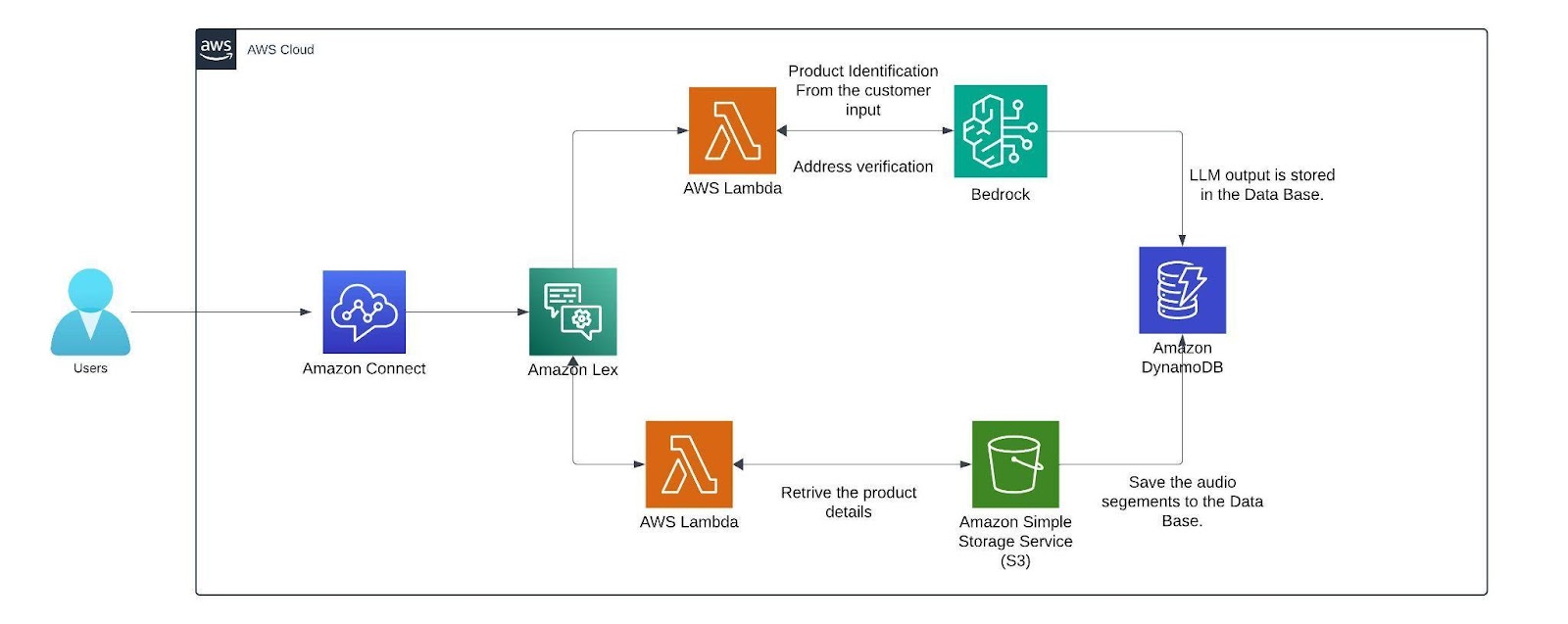
Today we are going to build a completely automated Voice Bot or to set up a call center flow which can provide you with real time conversation by using Amazon connect, Lex V2, DynamoDB, S3 and Lambda Function services available in the amazon console. The voice bot is built in German and below is the entire flow that is followed in this blog.
Advantages of using Lex bot
- Lex enables any developer to build conversational chatbots quickly.
- No deep learning expertise is necessary—to create a bot, you just specify the basic conversation flow in the Amazon Lex console. The ASR (Automatic Speech Recognition) part is internally taken care of lex so we don’t have to worry about that. You seamlessly integrate lambda functions, DynamoDB, Cognito and other services of AWS.
- Compared to other services Amazon Lex is cost effective.
Architecture Diagram
Architecture
Within the AWS environment, Amazon Connect is a useful tool for establishing a call center. It facilitates customer conversations and creates a smooth flow that combines with a German-trained Lex v2 bot. This bot is made to manage a range of client interactions, gathering vital data via slots (certain data points the bot needs) and intents (activities the bot might execute). The lex bot is then attached to a lambda function which gets triggered when the customer responds with a product name if not it directly connects the customer to the human agent for further queries.
The lambda function first finds the product name from the customer input then it is compared with the product's list which we have in the S3 bucket where it has details like price, weight, size, etc.. from an excel sheet (excel sheet) that now contains only two products namely Samsung Galaxy S24 and Apple iPhone 15 with the pricing weight and size of the product. The customer's input is matched with the closest product name in the excel sheet using the fuzzy matching algorithm.
The threshold for this matching of products is set to 60 or more which can be altered based on the need. Only if the customer wants to order, the bot starts collecting customer details like name and other details. The bot has a confirmation block which responds to the customer with what it understood from the customer input(like an evaluation ) if the customer doesn’t confirm it asks for that particular intent again. If you need, we can add the retry logic. Here a max retry of 3 is set to all the customer details just to make sure the bot retrieves the right data from the customers while transcribing from speech to text (ASR).
After retrieving the data from the customer before storing them we can verify the data collected from the customer is valid or not by passing it to the Mixtral 8x7B Instruct v0.1 model here i am using this model because my conversation will be in German and since the mistral model is trained in German and other languages it will be easy for me to process this model is called using the Amazon Bedrock service. We are invoking this model in the lambda function which has a prompt template which describes a set of instructions for example here i am giving instructions like just extract the product name from the callers input. After getting the response from LLM the output is then stored as session attributes in code snippet below along with the original data and the call recordings segments from the s3 bucket.
def update_custom_attribute(event, field_name, field_value):
session_state = event['sessionState']
if 'sessionAttributes' not in session_state:
session_state['sessionAttributes'] = {}
if 'userInfo' not in session_state['sessionAttributes']:
user_info = {}
else:
user_info = json.loads(session_state['sessionAttributes']['userInfo'])
updated_session_state = update_custom_attribute(event, 'name', name_value)
return {
"sessionState": {
"dialogAction": {
"type": "ElicitSlot",
"slotToElicit": "country"
},
"intent": {
"name": "CountryName",
"state": "InProgress",
"slots": {}
},
"sessionAttributes": updated_session_state['sessionAttributes']
},
"messages": [
{
"contentType": "PlainText",
"content": "what is the name of your country?"
}
]
}
Finally the recordings are stored in the dynamo db. with the time as primary key so that each record is unique.
AMAZON CONNECT
This is how the interface of Amazon Connect looks like you can create a new instance by clicking the add an instance button. you can specify the name of the URL connect instance. After creating the instance click the emergency login/access URL(sign in with the user account you created while creating the instance).
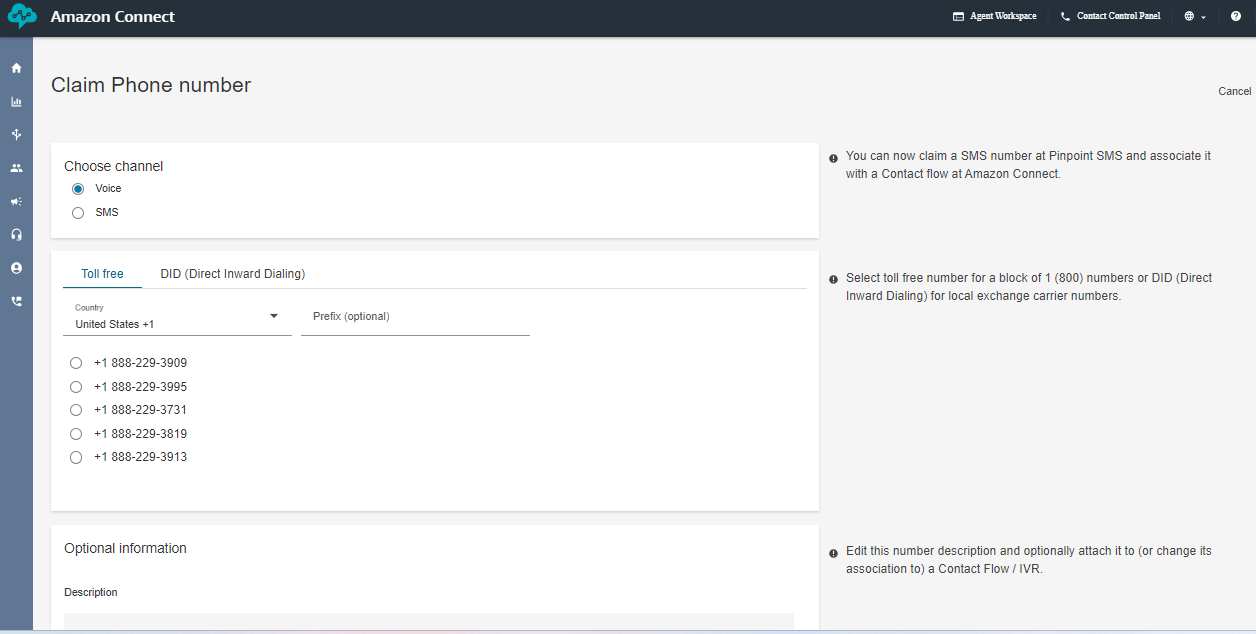
The below image creates the toll free numbers where you select the phone icon and select the phone number and click claim a number then select the voice for voice bot and the country in which you want to create the number for and click the save button remember while you are claiming the number for few countries you need to submit proof of documents refer this document [1] .
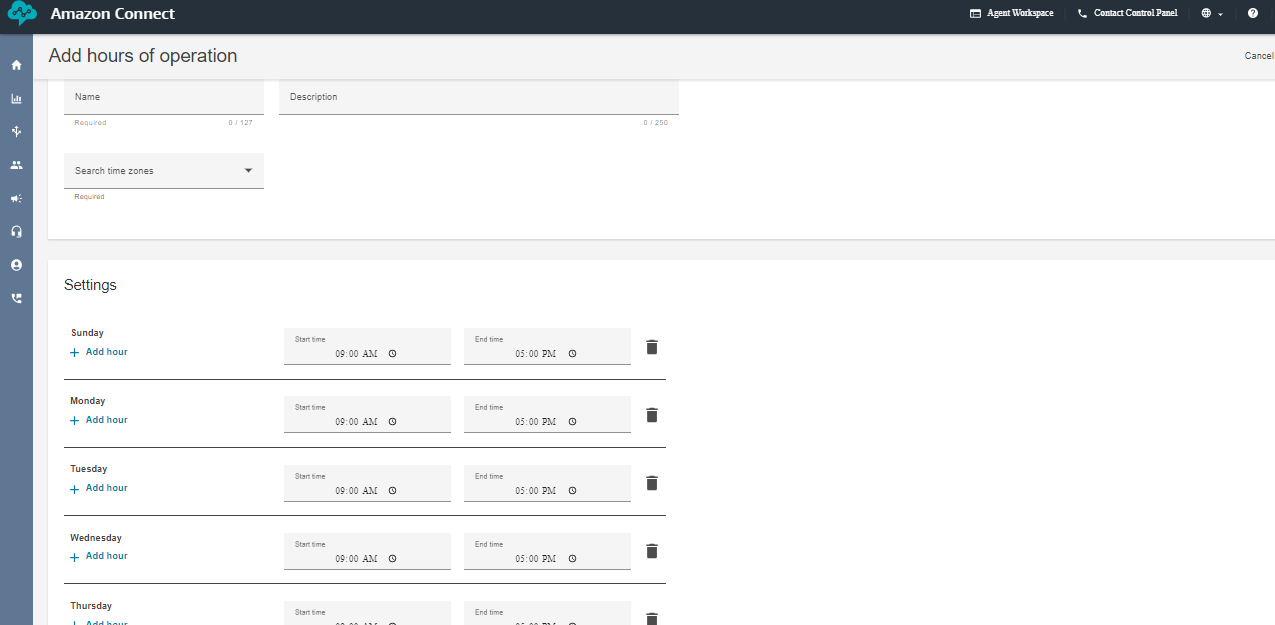
Next, create the working hours from the flow arrow of the console. I have created a 9 A.M to 5 P.M so that i can connect the call to the human agent if the caller has any queries. But if you want your voice bot to be available 24/7 then change the availability or create a new hours of operations.
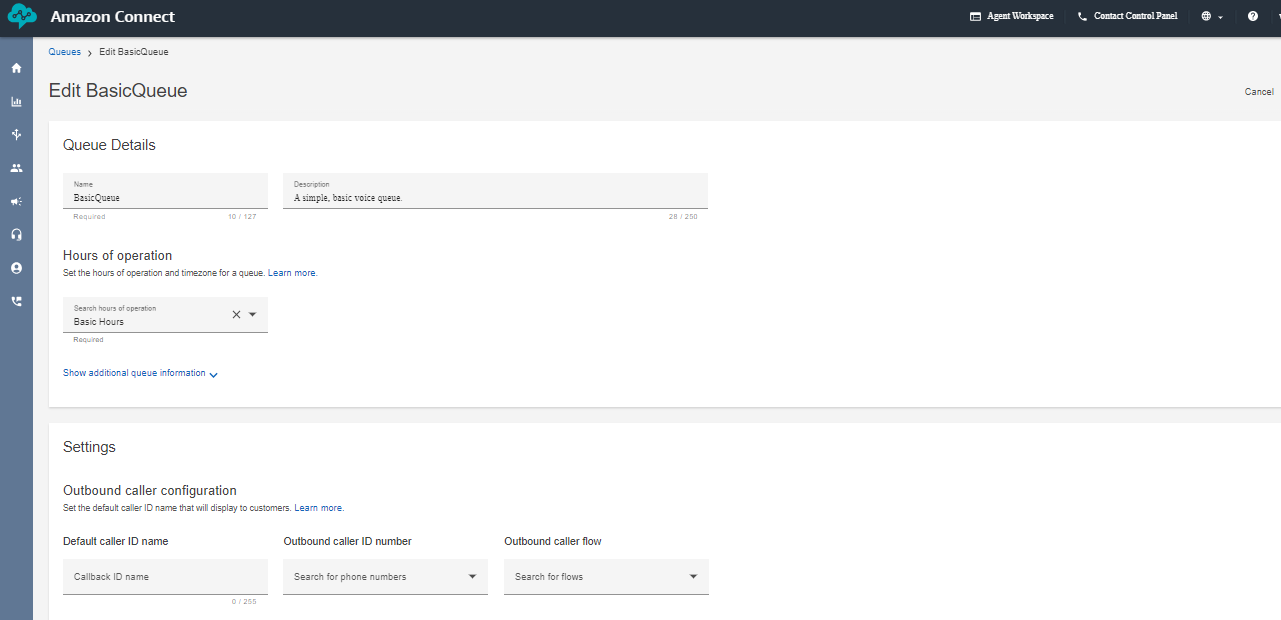
Next create a queue and add the hours of operation in the queue. That's it we are almost done setting up a few things in the Amazon Connect now lets go inside the flows and look how our complete flow looks like.
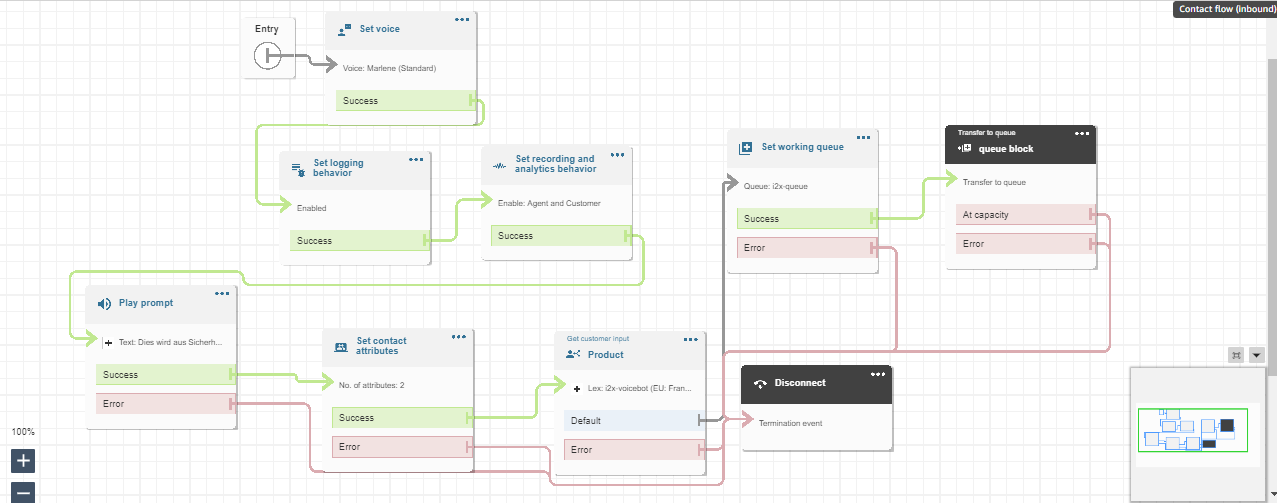
This above diagram is the Amazon Connect Flow where the set voice block is used to set a specific voice. The set logging behavior block and set recording and analytics behavior is used to record the conversation after connecting to the agent. Play prompt is used to respond a simple prompt saying the call is recorded. The set contacts attribute block contains two session attributes one for focusing on the user’s voice rather than the background noise and another is to not barge in when the bot is responding after adding these two session attributes in the connect flow the call is able to pass the flow even when there a certain amount of background noise. The get customer input block is used for connecting the call to the lex bot if the customer wants to connect to the agent the set working queue ensures to connect to the agent. Finally the call is disconnected using the disconnect block.
AMAZON LEX
Next, We can create a bot from scratch by clicking on the create bot icon on the lex console. you can specify the name of the bot with the required IAM permissions and select “no” for the child protection. In the next step choose the language you want your bot to train and select the voice. The intent classification score is set in between 0 to 1. It is similar to a threshold where the bot can classify the customers/user reason for example, if i have multiple intent based on the score it connects to the most likely intent. you can also add multiple languages to train your
bot.
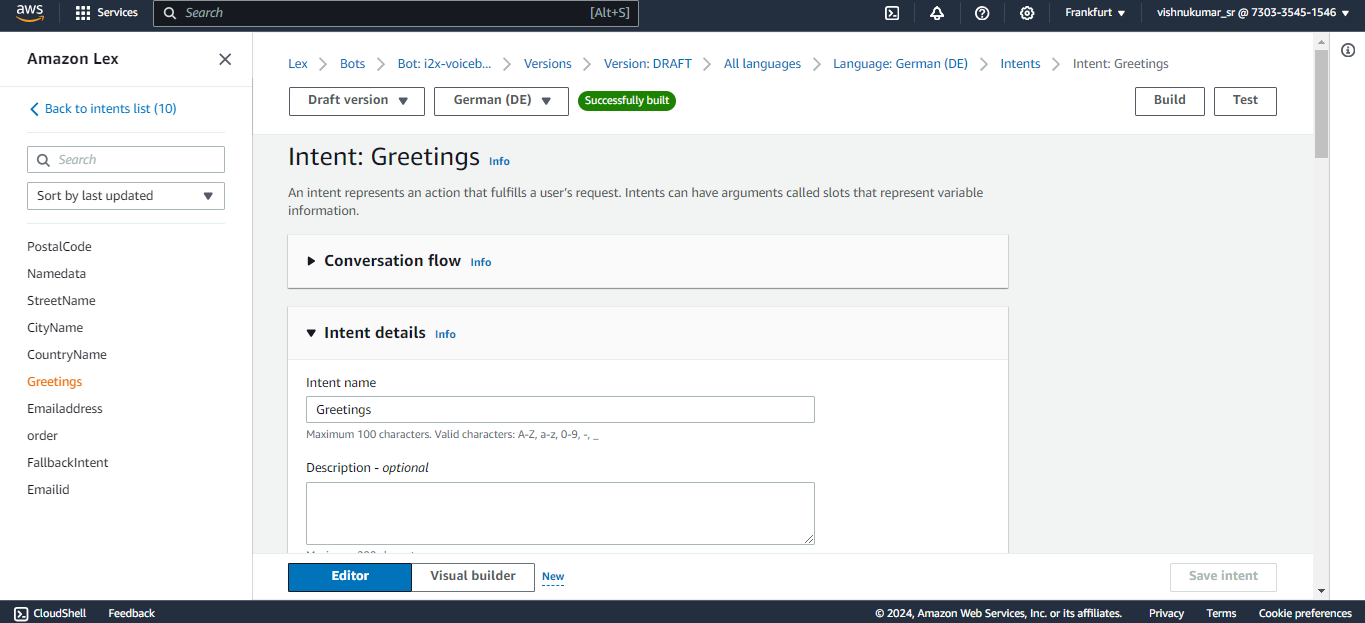
You can create an intent to know the customers/callers need for calling like, Ordering a mobile in our case we expect a product name from the customer like Samsung galaxy or apple iPhone. The sample utterances are used to initiate the conversation with the bot at the very beginning of the conversation for example we can say hi, hello, i want to order, etc. to trigger the intent that you expect your bot to responded based the customer reason. If you have multiple intents like greetings, order, address you connect these intent in a flow one after other in a flow using the go to intent block.
Slots are used to fulfill the intent like for example here the bot needs to know which product the customer wants to order to complete this greetings intent. Likewise you can create slots in a single intents or create separate slots in each intent and connect them in the flow. The confirmation block is used for rechecking the user input like the product name based on the response from the customer (if the customer says “yes” it will go to the next step if “no” then it goes to the previous state and asks the question again).
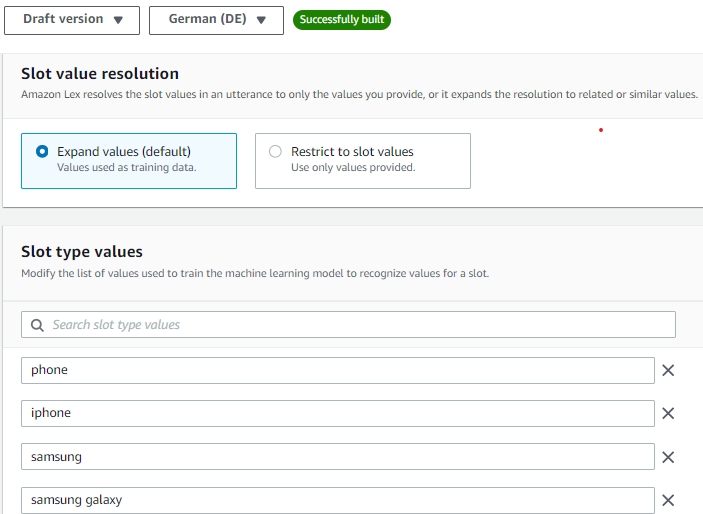
You can improve the accuracy of the lex bot by recognizing what the customer is saying speech recognition (ASR) by creating a custom slot type and training the bot with a few examples of what the customer might say. For example, in our case the customer might say the product names like iPhone, apple iPhone, iPhone 15 etc.. so add few values in the slot utterances which can improve the speech detection. You can create multiple custom slot types like product name, customer name, address, etc..
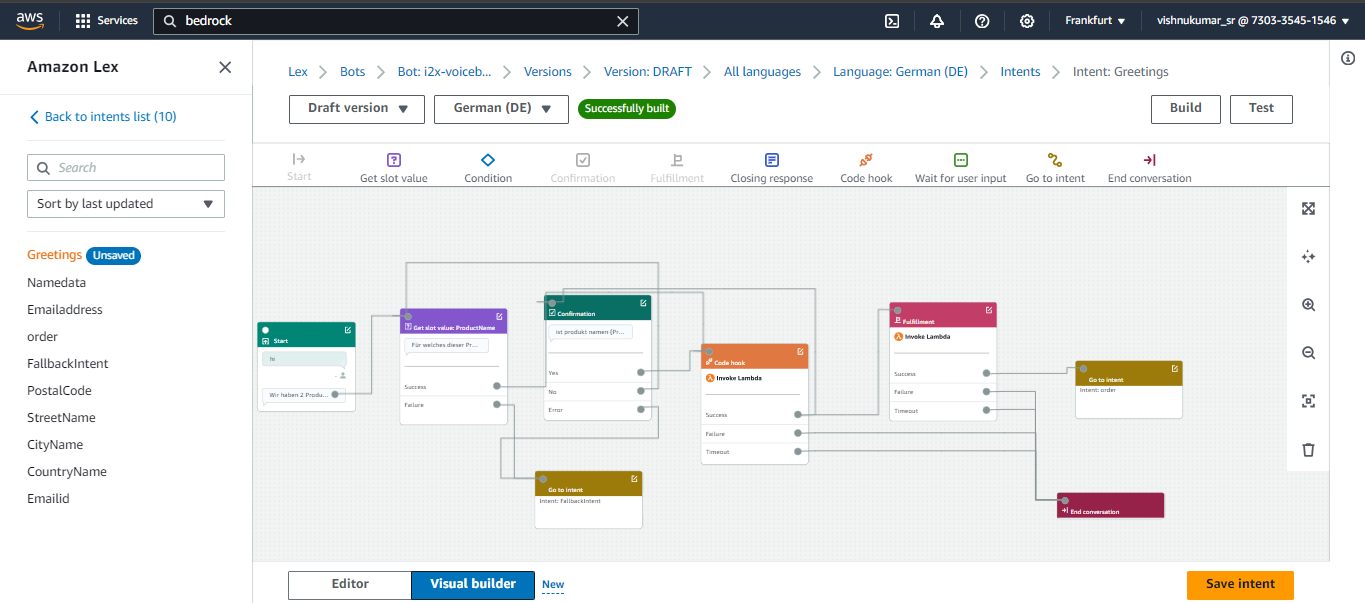
You can click the Visual Builder option to view your flow in Lex V2 bot let’s discuss what each block does and we can simply drag and drop these blocks to create the flow . Lambda Block or code hook block are used in the flow when you want your bot to retrieve information from different services(S3 which is done in a lambda function). For example my product details like price, size, weight all are stored in a S3 bucket to retrieve the data and we are also using fuzzy logic to match the closest response. we can invoke only one lambda function per bot so we have added the logic passing the customer input to the Mistral 8X7 model for verification and for storing the final output with the audio folder to the DynamoDB.
Lambda Function
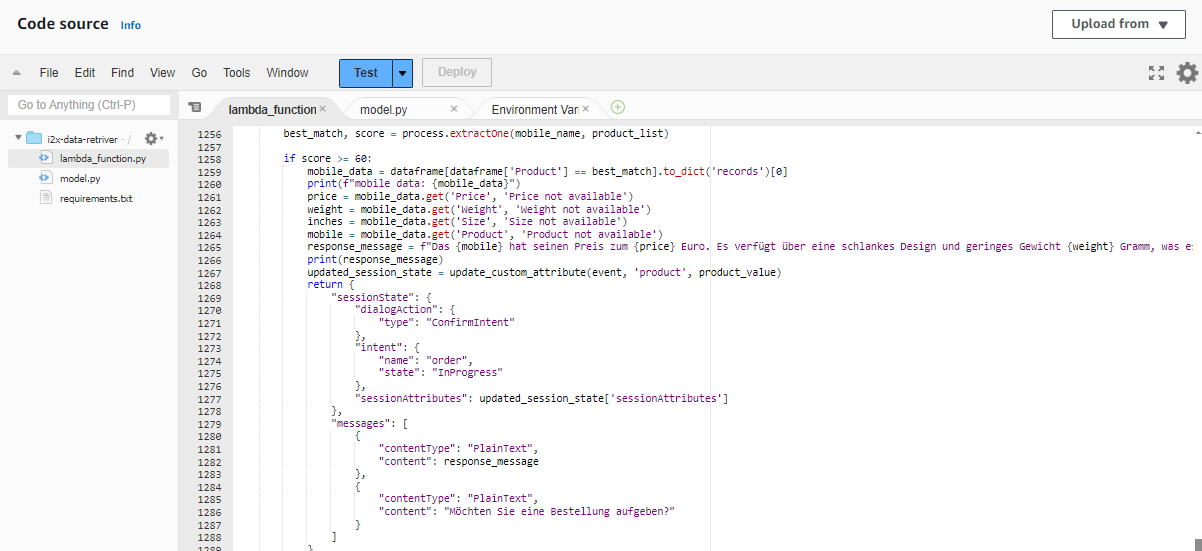
This Lambda Function is used to retrieve the product information after getting the customers input. For example when the customer says Apple iPhone the lambda function brings the details from the S3 bucket and it matches it using the fuzzy logic we have set the score to a threshold of 80 or more if the score of user input matches the threshold value it will return the product details and move to the next intent. The bots expects a response with in 3-4 seconds after it asking the user intent if no response is received (when the caller is on silent or hasn’t said anything) the bot was initially taking the empty string as response and it directly connected to the agent but we have included a logic to continue the flow by asking for the input again if it receives an empty input.In the next session let's look how to store the data in aDynamoDB table do look at the references below.
Sample Calls
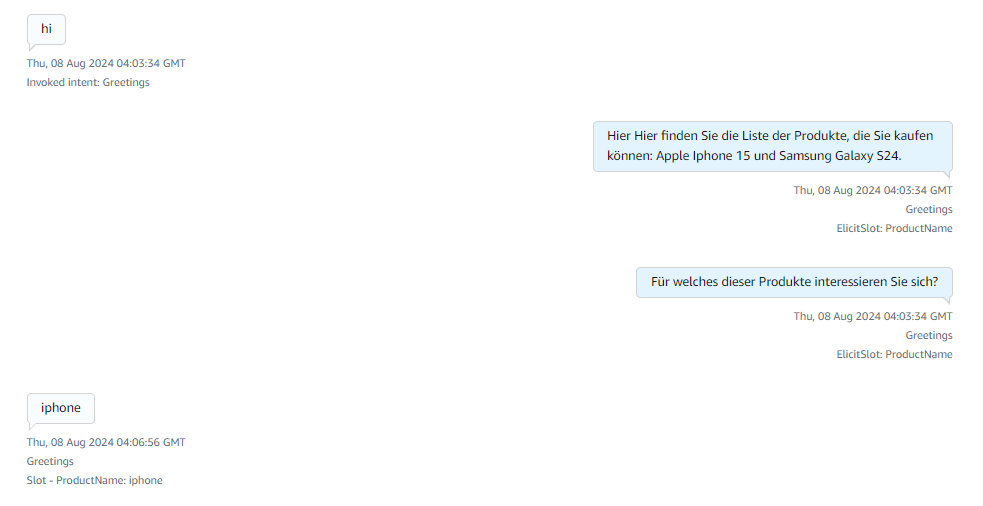
Here after receiving the greeting the available products information is responded and ask for what product they are looking for.

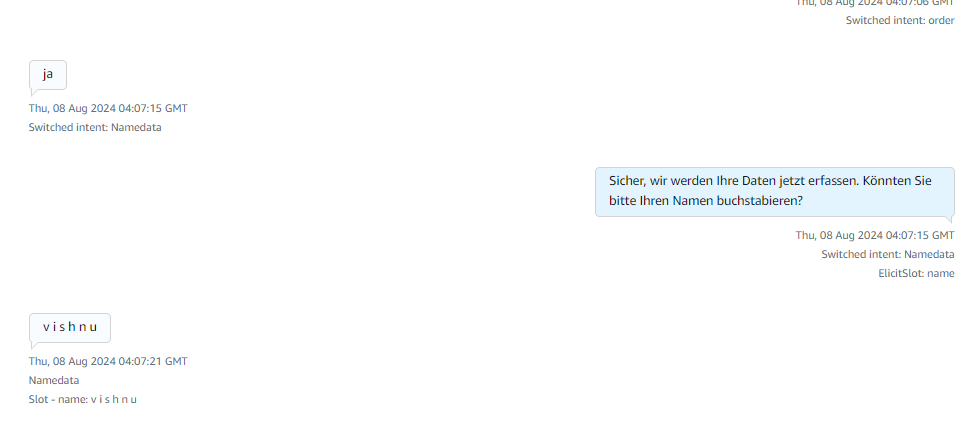
After receiving the product name it explains about the products and asks for order confirmation if yes it starts collecting caller details if no or if there are no products matching the caller requirement then it connects to the human agent for more information.
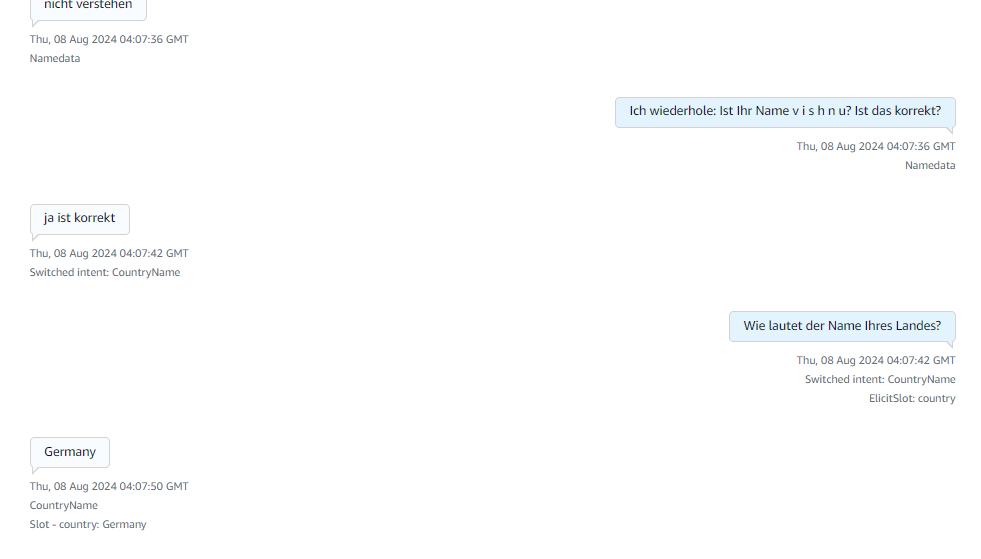
Here in the above image it collects details like name and the country details of the caller.
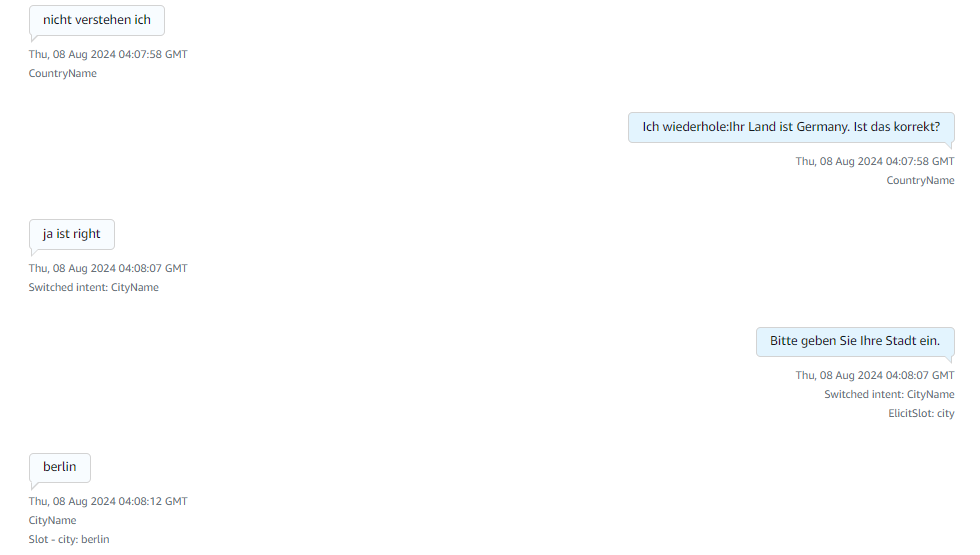
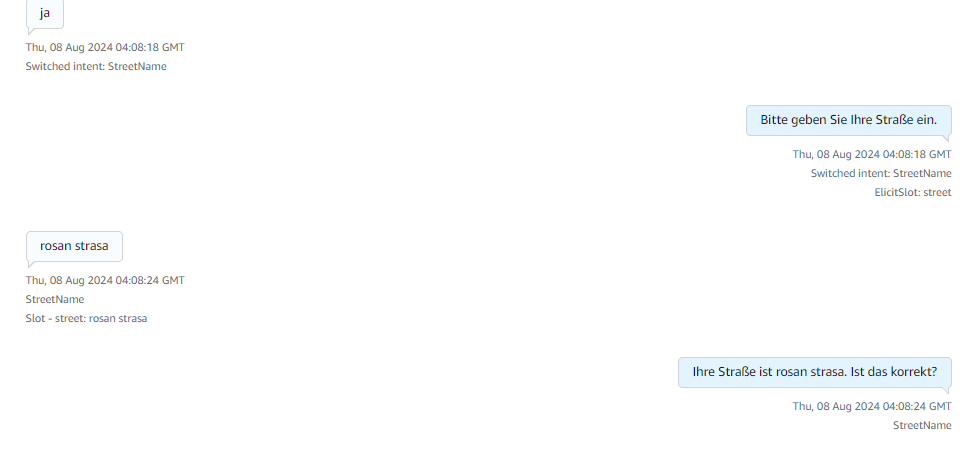
Then it starts collecting the city name and the street name of the caller.

Finally it collects the zip code/postal code and replies to a thankyou message with an order confirmation message from the lex. These images describe the complete flow of how Amazon Lex responds to the customer. It has incorporated a retry logic of max 3 times where the bot asks the customer if it is not able to understand the customer intent. The bot has been trained to connect to a human agent if it is not able to respond or if the customer directly says that they wanted to talk to an agent. After reaching the Email Address intent Fallback it will give a thankyou message and will connect to the agent if the customer has any doubts.
References
Region requirements for ordering and porting phone numbers - Amazon Connect
AWS' Generative AI Strategy: Rapid Innovation and Comprehensive Solutions
Understanding Generative AI
Generative AI is a revolutionary branch of artificial intelligence that has the capability to create new content, whether it be conversations, stories, images, videos, or music. At its core, generative AI relies on machine learning models known as foundation models (FMs). These models are trained on extensive datasets and have the capacity to perform a wide range of tasks due to their large number of parameters. This makes them distinct from traditional machine learning models, which are typically designed for specific tasks such as sentiment analysis, image classification, or trend forecasting. Foundation models offer the flexibility to be adapted for various tasks without the need for extensive labeled data and training.
Key Factors Behind the Success of Foundation Models
There are three main reasons why foundation models have been so successful:
1. Transformer Architecture: The transformer architecture is a type of neural network that is not only efficient and scalable but also capable of modeling complex dependencies between input and output data. This architecture has been pivotal in the development of powerful generative AI models.
2. In-Context Learning: This innovative training paradigm allows pre-trained models to learn new tasks with minimal instruction or examples, bypassing the need for extensive labeled data. As a result, these models can be deployed quickly and effectively in a wide range of applications.
3. Emergent Behaviors at Scale: As models grow in size and are trained on larger datasets, they begin to exhibit new capabilities that were not present in smaller models. These emergent behaviors highlight the potential of foundation models to tackle increasingly complex tasks.
Accelerating Generative AI on AWS
AWS is committed to helping customers harness the power of generative AI by addressing four key considerations for building and deploying applications at scale:
1. Ease of Development: AWS provides tools and frameworks that simplify the process of building generative AI applications. This includes offering a variety of foundation models that can be tailored to specific use cases.
2. Data Differentiation: Customizing foundation models with your own data ensures that they are tailored to your organization's unique needs. AWS ensures that this customization happens in a secure and private environment, leveraging your data as a key differentiator.
3. Productivity Enhancement: AWS offers a suite of generative AI-powered applications and services designed to enhance employee productivity and streamline workflows.
4. Performance and Cost Efficiency: AWS provides a high-performance, cost-effective infrastructure specifically designed for machine learning and generative AI workloads. With over a decade of experience in creating purpose-built silicon, AWS delivers the optimal environment for running, building, and customizing foundation models.
AWS Tools and Services for Generative AI
To support your AI journey, AWS offers a range of tools and services:
1. Amazon Bedrock: Simplifies the process of building and scaling generative AI applications using foundation models.
2. AWS Trainium and AWS Inferentia: Purpose-built accelerators designed to enhance the performance of generative AI workloads.
3. AWS HealthScribe: A HIPAA-eligible service that generates clinical notes automatically.
4. Amazon SageMaker JumpStart: A machine learning hub offering foundation models, pre-built algorithms, and ML solutions that can be deployed with ease.
5. Generative BI Capabilities in Amazon QuickSight: Enables business users to extract insights, collaborate, and visualize data using FM-powered features.
6. Amazon CodeWhisperer: An AI coding companion that helps developers build applications faster and more securely.
By leveraging these tools and services, AWS empowers organizations to accelerate their AI initiatives and unlock the full potential of generative AI.
Some examples of how Ankercloud leverages AWS Gen AI solutions
- Ankercloud has leveraged Amazon Bedrock and Amazon SageMaker which powers VisionForge which is a tool to create designs tailored to user’s vision, democratizing creative modeling for everyone. VisionForge was used by our client ‘Arrivae’ a leading interior design organization, where we helped them with a 15% improvement in interior design image recommendations, aligning with user prompts and enhancing the quality of suggested designs. Additionally, the segmentation model's accuracy improvement to 65% allowed for a 10% better personalization of specific objects, significantly enhancing the user experience and satisfaction. Read more
- Another example of using Amazon SageMaker, Ankercloud worked with ‘Minalyze’ who are the world's leading manufacturer of XRF core scanning devices and software for geological data display. We were able to create a ready to use and preconfigured Amazon Sagemaker process for Image object classification and OCR analysis Models along with ML- Ops pipeline. This helped Increase the speed and accuracy of object classification and OCR which leads to increased operational efficiency. Read more
- Ankercloud has helped Federmeister, a facade building company, address their slow quote generation process by deploying an AI and ML solution leveraging Amazon SageMaker that automatically detects, classifies, and measures facade elements from uploaded images, cutting down the processing time from two weeks to just 8 hours. The system, trained on extensive datasets, achieves about 80% accuracy in identifying facade components. This significant upgrade not only reduced manual labor but also enhanced the company's ability to handle workload fluctuations, greatly improving operational efficiency and responsiveness. Read more
Ankercloud is an Advanced Tier AWS Service Partner, which enables us to harness the power of AWS's extensive cloud infrastructure and services to help businesses transform and scale their operations efficiently. Learn more here
How Ankercloud Accelerates Your Sovereign Transformation
As official Launchpartner of the AWS European Sovereignty Cloud (ESC) our customer benefits from:
Assess with Confidence
Evaluate workloads, data sensitivity, and compliance obligations to determine where sovereignty matters most.
Migrate with Precision
Transition critical systems using sovereignty-by-design landing zones built for auditability, security, and compliance.

Modernize Securely
Adopt AI, automation, and data platforms while maintaining strict residency controls and governance alignment.
Optimize Funding and Growth
Leverage AWS migration programs (e.g. MAP Program) to minimize cost barriers and accelerate return on compliance investment.
SUCCESS STORIES
Our Customers Stories

gocomo Migrates Social Data Platform to AWS for Performance & Scalability with Ankercloud


Migration a Saas platform from On-Prem to GCP


Benchmarking AWS performance to run environmental simulations over Belgium
.jpg)
Get Started: Build Your Sovereignty Roadmap
A sovereign cloud is a long-term operating model, not a one-time migration. Starting your strategy early, especially with the AWS ESC Program, is key to a scalable and efficient future expansion.
Sovereignty assessment: Understand your current landscape, risk exposure, and regulatory drivers.
Roadmap and architecture: Design a target state across European Regions and the AWS European Sovereign Cloud.
Execution and continuous compliance: Implement, migrate, and monitor with an operating model that keeps pace with regulation.
.jpg)
FAQs
The AWS European Sovereign Cloud is a dedicated cloud infrastructure designed to meet strict EU data residency, operational autonomy, and regulatory requirements. It ensures data, metadata, and operations remain fully within EU jurisdiction and are managed by EU-resident personnel.
While existing AWS European Regions already provide strong data residency and compliance, the European Sovereign Cloud offers additional operational independence, separate identity and billing systems, EU-only operational control, and dedicated governance specifically designed for sovereignty-sensitive workloads.
Yes. Applications built on AWS can be migrated to the European Sovereign Cloud. Ankercloud helps assess your workloads, plan the migration, and ensure compatibility without requiring major application redesign.
As an AWS Premier Tier Partner and ESC Launch Partner, Ankercloud provides sovereignty readiness assessments, architecture design, migration support, compliance implementation, and ongoing governance to ensure a smooth and compliant transition.
Organizations in highly regulated sectors such as financial services, healthcare, public sector, defense, and critical infrastructure that require strict EU sovereignty, operational autonomy, and regulatory compliance will benefit the most.
The Ankercloud Team loves to listen